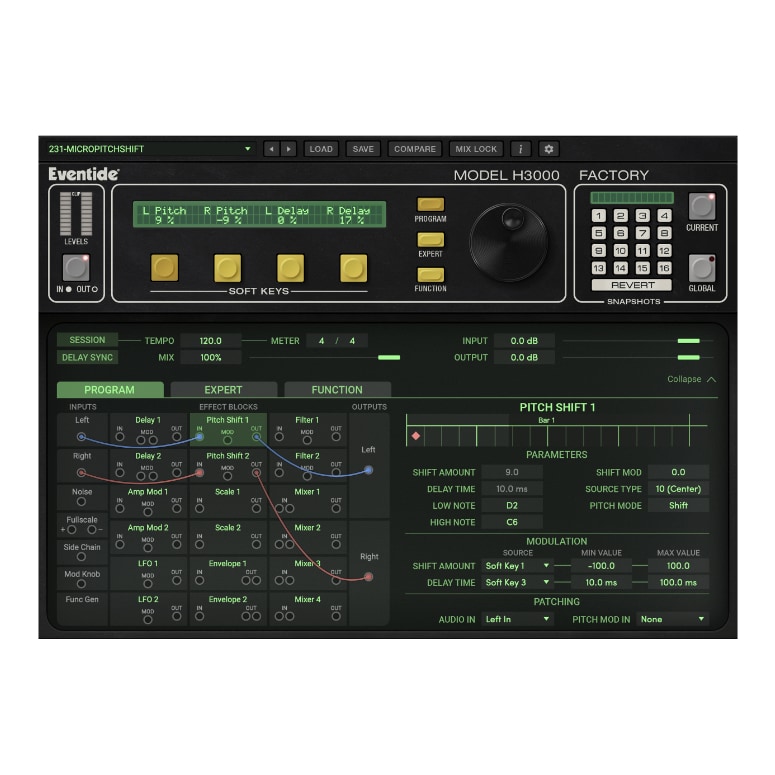
True Analog Modeling
H3000 Factory Mk II features brand new modeling of the analog-to-digital and digital-to-analog converter sections of the original H3000. Additionally, new filter recreations accurately replicate the resonance and self-oscillation behavior of the hardware, faithfully capturing its magical sound.
Intuitive Workflow
Features modern graphics that highlight the iconic design of the H3000 Harmonizer, now with a resizable user interface. Offers versatility with an expandable view and a streamlined patching workflow.
Endless Possibilities
Updated with 600+ presets including recreations from the original H3000 and new custom artist presets.
Nick Hook Sample Pack
Experience the H3000 Mk II plug-ins like never before with an exclusive samples pack designed by producer/collaborator/DJ, Nick Hook. Renowned for collaborations with Run the Jewels, Gangsta Boo, Young Thug, and more, the pack features samples from his vintage gear collection, including a LinnDrum, Moog Model-D, Roland TR-808, JP-8000, and Korg MS20.
Additional Features:
- 621 presets
- Modular interface to combine up to 18 effects blocks together
- Assignable Macro Soft Keys
- 19 waveforms with Function Generator
- MIDI Control
- Includes inputs for Sidechain and Noise
- Effects blocks include delays, amplitude modulators, envelope followers, pitch shifters, filters and more.
Step-by-Step Guide: Register & Install Your Eventide Plugins from Plugin Discounts
Activating Eventide Codes (Purchased from Plugin Discounts)
Follow these steps to enable your license and access the installer:
- Step 1: Log in to your Eventide account
Go to https://www.eventideaudio.com/my-account. Create an account if you don’t have one. - Step 2: Register your plugin
Go to My Account → Register Products (or “Register a New Product”).
Enter your Serial Number and License Key.
Also enter your iLok.com username.
Submit — the license is automatically sent to your iLok account. - Step 3: Download the installer
Go to the Downloads page.
Download the correct installer for your OS (Mac or Windows) and plugin format (VST/AU/AAX). - Step 4: Install the plugin(s)
Windows: Run the .exe installer.
macOS: Open the .dmg and run the .pkg installer.
Follow the on-screen prompts. - Step 5: Authorize with iLok License Manager
Download/install iLok License Manager from www.ilok.com if you don’t have it.
Open iLok License Manager → sign in.
Find your Eventide license and drag it to your Computer (or iLok dongle).
Click Activate. - Step 6: Open your DAW
Launch your DAW and rescan for new plugins. The Eventide plugin should now appear and work.
Notes:
- Eventide plugins require iLok authorization (no physical dongle needed unless you choose one).
- Supported DAWs: Most major ones that support VST, AU, or AAX.
If you run into issues, check the official troubleshooting on the same page.