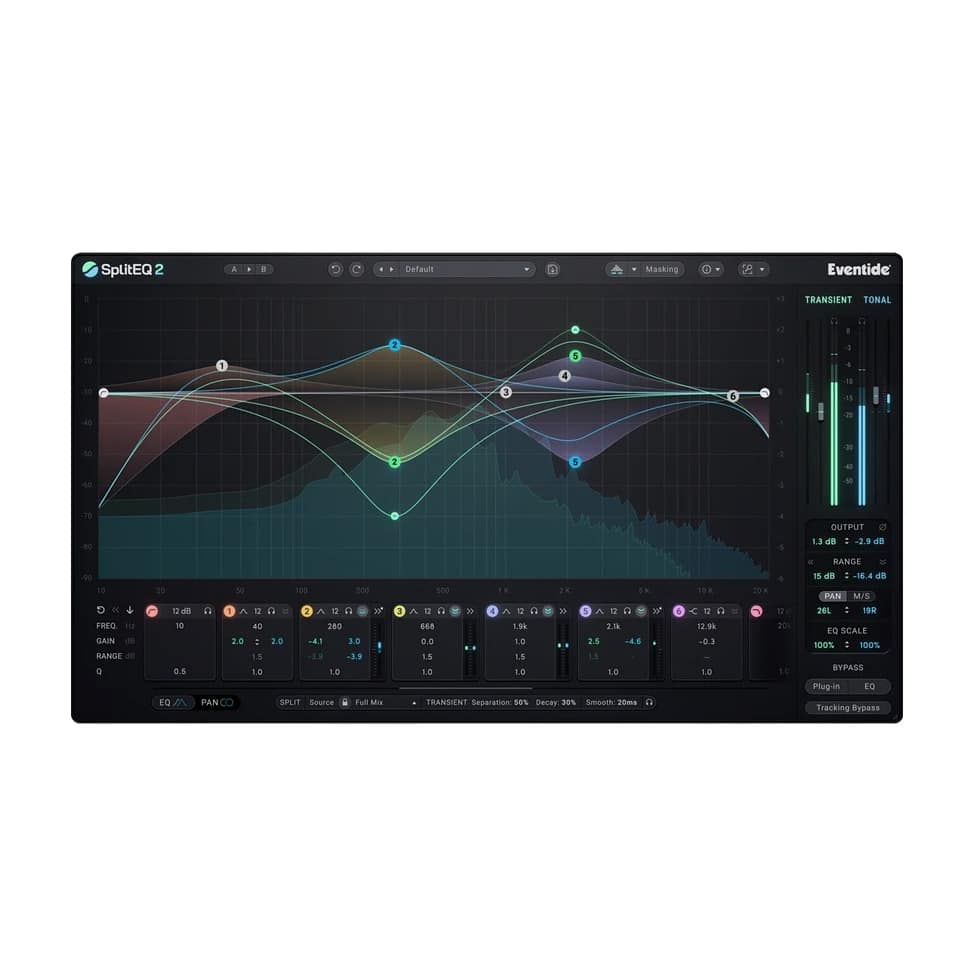
Eventide SplitEQ 2 is a groundbreaking parametric and dynamic EQ plugin that redefines audio equalization using patented Structural Split™ technology. Instead of treating the entire signal as one, it intelligently separates incoming audio into two distinct streams: Transient (rapid attacks, noise, plosives, and sibilance) and Tonal (sustained notes, harmonics, tone, and ambiance). This allows independent EQ, dynamics, and spatial processing on each stream, delivering surgical precision for repairs while unlocking creative possibilities that traditional EQs cannot match.
SplitEQ 2 excels at corrective and creative tasks:
- Repairing nasty problems (such as kick boom or vocal sibilance) without losing punch or body.
- Rebalancing and unmasking competing tracks in a mix.
- Enhancing punch, detail, sheen, and character.
- Widening and controlling the stereo field with per-band precision.
It eliminates common EQ trade-offs—for example, it can cut vocal plosives without thinning low-end richness, tame a kick’s tonal resonance while preserving its attack when it competes with bass, or soften guitar strums while keeping cabinet reverb intact. The real-time spectrum analyzer displays Transient and Tonal streams separately for “X-ray vision,” while new masking visualization shows frequency conflicts between tracks (and can link multiple SplitEQ 2 instances) so you can see and solve masking problems in real time.
With a world-class 8-band parametric EQ, six dynamic bands (for compression or expansion on the transient signal, tonal signal, or both), Global Dynamics, pristine musical filters, and extensive controls, SplitEQ 2 works on individual tracks, full mixes, or two-track loops. It includes over 290 factory presets, plus A/B comparison, Undo/Redo, a resizable GUI, and streamlined workflow tools such as creating EQ bands directly on the plot and a Tracking Bypass for zero-latency recording across instances. Compatible with all major DAWs via VST3, AU, and AAX, it is available for macOS and Windows.
Key Features:
- Patented Structural Split™ technology separates audio into independent Transient and Tonal streams.
- 8-band parametric EQ with Peak, Notch, Bandpass, High Shelf, Low Shelf, Tilt Shelf, High Pass, and Low Pass filters.
- Six dynamic bands with per-band compression or expansion that can act on the transient signal, the tonal signal, or both (range, threshold, ratio, attack, release, and Auto modes).
- Global Dynamics for transient and tonal content, routable pre or post.
- Real-time masking visualization that shows conflicts between competing sources (with instance linking and direction swap).
- Assignable stereo processing: dedicate any of the eight bands to Left, Right, Mid, or Side, or use continuous Pan/Width, with independent Transient and Tonal processing.
- Source Tuning with seven new source types (including Distorted Guitar, Strings, Synth Lead, Synth Pad, Horn, Horn Section, and Woodwinds) for improved separation quality.
- Real-time spectrum analyzer displays Transient and Tonal streams separately.
- Independent Transient and Tonal output level controls.
- Global or independent EQ curve scaling.
- Adjustable Split controls for fine-tuning the separation algorithm.
- Over 290 factory presets plus user preset support.
- Tracking Bypass (one control for zero-latency monitoring across all instances).
- Streamlined workflow: create bands directly on the plot and view parameters/dynamics metering for multiple bands at once.
- A/B comparison, Undo/Redo, and resizable GUI with zoom.
Step-by-Step Guide: Register & Install Your Eventide Plugins from Plugin Discounts
Activating Eventide Codes (Purchased from Plugin Discounts)
Follow these steps to enable your license and access the installer:
- Step 1: Log in to your Eventide account
Go to https://www.eventideaudio.com/my-account. Create an account if you don’t have one. - Step 2: Register your plugin
Go to My Account → Register Products (or “Register a New Product”).
Enter your Serial Number and License Key.
Also enter your iLok.com username.
Submit — the license is automatically sent to your iLok account. - Step 3: Download the installer
Go to the Downloads page.
Download the correct installer for your OS (Mac or Windows) and plugin format (VST/AU/AAX). - Step 4: Install the plugin(s)
Windows: Run the .exe installer.
macOS: Open the .dmg and run the .pkg installer.
Follow the on-screen prompts. - Step 5: Authorize with iLok License Manager
Download/install iLok License Manager from www.ilok.com if you don’t have it.
Open iLok License Manager → sign in.
Find your Eventide license and drag it to your Computer (or iLok dongle).
Click Activate. - Step 6: Open your DAW
Launch your DAW and rescan for new plugins. The Eventide plugin should now appear and work.
Notes:
- Eventide plugins require iLok authorization (no physical dongle needed unless you choose one).
- Supported DAWs: Most major ones that support VST, AU, or AAX.
If you run into issues, check the official troubleshooting on the same page.