Analog Lab Pro: The Ultimate Keyboard Anthology
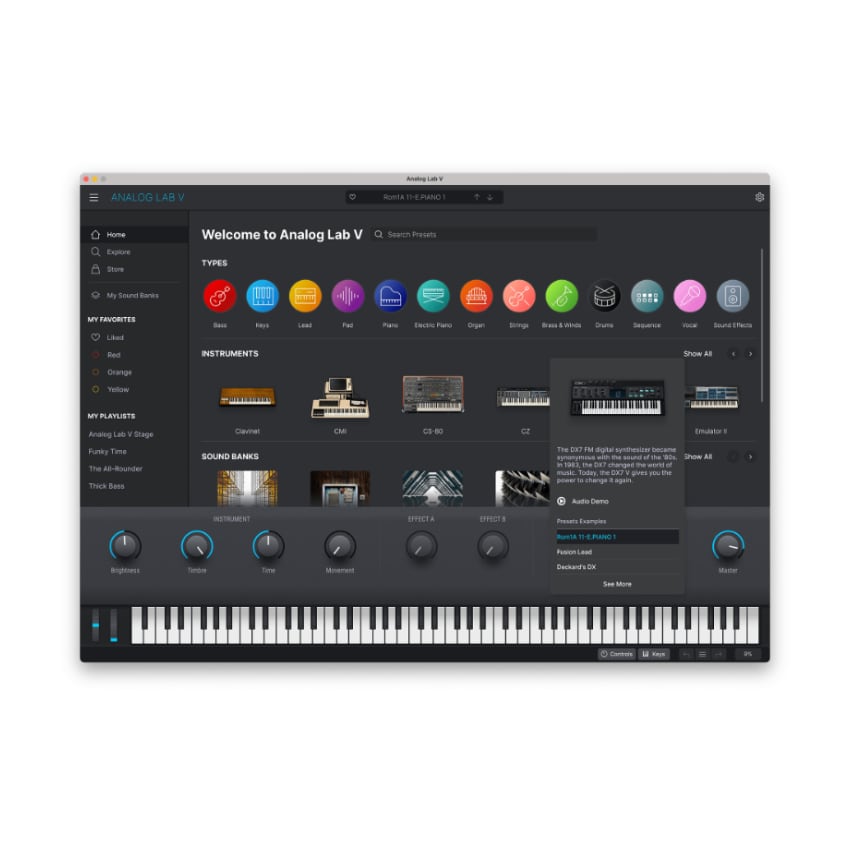
Analog Lab Pro is the definitive “greatest hits” of Arturia’s software instrument catalog. It serves as a central hub where users can access thousands of curated presets from the entire V Collection and Pigments in one streamlined interface. It is widely considered the best starting point for producers who want high-quality sounds without deep-diving into complex synthesis.
Key Features of Analog Lab Pro:
- Massive Library: Access to over 2,000 professional presets across dozens of instruments.
- Simplified Control: Focus on production with intuitive, pre-mapped macros (4 new macro controls) to tweak sounds quickly without deep editing.
- Layering/Multis: Combine two different sounds, split them across the keyboard, or layer them for complex patches.
- Smart Browsing: Search by instrument type, style, or genre to find the perfect sound instantly.
- Studio View: Combine any two instruments into a single “Multi” for layered sonic textures.
- Stage View: Prepare playlists and performance settings for seamless live shows.
- Hardware Integration: Automatic parameter mapping for Arturia’s KeyLab and MiniLab controllers.
Step-by-Step Guide: Register & Install Your Arturia Plugins from Plugin Discounts
Activating Arturia Plugins (Purchased from Plugin Discounts)
Registering and installing Arturia plugins is managed primarily through the Arturia Software Center (ASC). To complete this process, you will need your Serial Number (format: XXXX-XXXX-XXXX-XXXX) and your Unlock Code. Uc: = Unlock Code (format: XXXXXXXX)
Follow these steps to enable your license and access the installer:
- Create or Log In to Your Arturia Account
- Go to the Arturia Account Creation page if you don’t already have one.
- Follow the instructions to register your details and confirm your account via the verification link sent to your email.
- Register Your Product
- Log in to your MyArturia account.
- Navigate to the Product Registration page or click “Register a new product” on your account dashboard.
- Enter your Serial Number and Unlock Code in the corresponding fields and click Register.
- Download and Install Arturia Software Center (ASC)
- The ASC is the central hub used to download, activate, and update all your Arturia instruments and effects.
- Download the Arturia Software Center (ASC) for your operating system (macOS or Windows).
- Run the installer and follow the on-screen prompts to complete the setup.
- Activate and Install Your Plugins
- Launch the Arturia Software Center and log in using your account credentials.
- In the main dashboard, locate your registered product in the list.
- Click the green “Activate” button next to the product to authorize it on your current computer.
- Once activated, click the “Install” button to download and install the software. You may be asked to define your preferred destination folders for VST/AU files during the first installation.
Enjoy!